+0.00m / STUDIO
Mapnyx Studio
The workspace behind every venue. Plans come in, structure goes on, geometry gets drawn over the real site, the navigation graph is checked before anyone can publish it — and what ships is a numbered package, not a file somebody overwrote.
What follows is the product as it stands, read off the shipping build. Where Studio is candid about a limit, so is this page.
- 01 Upload
- 02 Map
- 03 AI
- 04 Edit
- 05 Connect
- 06 Validate
- 07 Preview
- 08 Publish
- 09 Navigate
- 10 Analyse
Checked against the shipping product on
On this page
- Every venue in one workspace
- The venue is a record, not a drawing
- Campus, building, floor
- Drawn over the real site
- It draws only what you tick
- How the map opens, per venue
- Walk it before anyone else does
- Checks that name the fix
- A numbered revision, then the edge
- Four ways in, issued per venue
- Six reports, not a dashboard to interpret
- Built to run other people's venues
+0.00m / ESTATE
Every venue in one workspace
Studio opens on the estate, not on a blank canvas. Each venue carries its own state, structure and history, so an operator running six shows and a stadium sees where each one stands without opening anything.
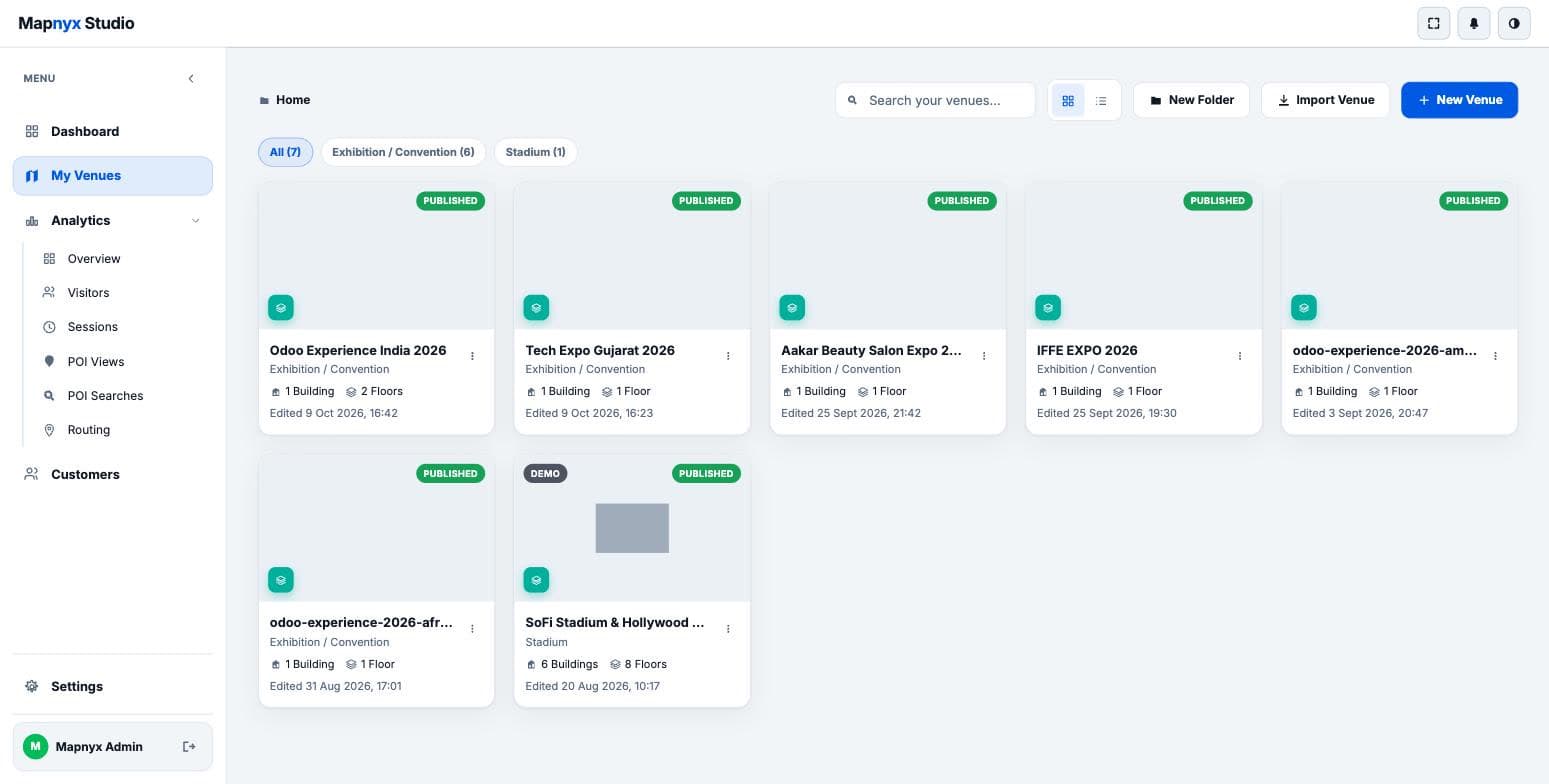
On every venue card
- Its floor-plan thumbnail, so you recognise it before you read it
- Published, draft or demo, shown as a badge
- Building and floor counts
- When it was last edited, and by implication whether anyone is on it
Across the estate
- Search across venues, and group them into folders
- Filter by venue type — exhibition and convention, stadium, and the rest
- Import a venue rather than starting from an empty floor
- Switch between a grid of thumbnails and a dense list
+0.00m / VENUE RECORD
The venue is a record, not a drawing
Before any geometry exists, a venue is a row with an identity: a name, a short code, a public slug and a type. Everything downstream — the portal URL, the QR code, the embed, the analytics — hangs off that identity, which is why it survives a re-plan.
The public path is the slug plus a token, and the same path backs the portal, the QR code and the embed. One identity, three ways in.
Identity
- Name, short code and the public slug the portal is served from
- Venue type, which selects how the venue is presented
- Published or draft status
- Building and floor counts, kept in step with the structure beneath
Presentation
- A description, and a venue image for listings and link previews
- Created and last-updated timestamps on the record itself
+3.00m / STRUCTURE
Campus, building, floor
A venue is a hierarchy before it is a map. Floors belong to buildings, buildings to a campus, and each level knows where it sits vertically — which is what makes multi-floor routing possible at all.
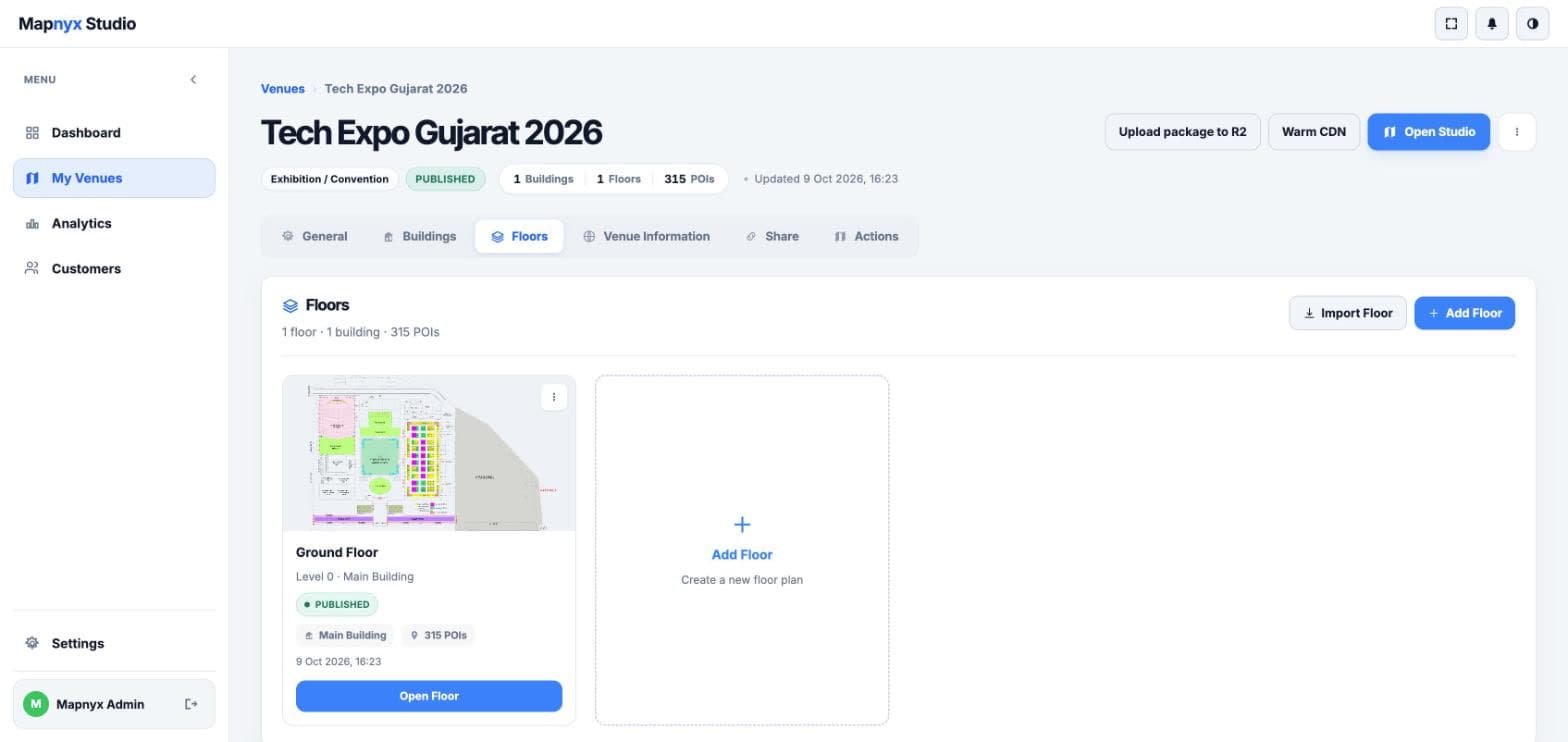
Per floor
- A level number and the building it belongs to
- Its own published state, independent of its neighbours
- Its own place count
- Its own last edit
Getting floors in
- Import a floor from an existing plan
- Or add an empty floor and draw it
- Real-world floor dimensions, so distances and walk times mean something
- Georeference the indoor plan to the site's actual latitude and longitude
+3.00m / EDITOR
Drawn over the real site
The editor puts the plan on the map it actually occupies, with a streets or satellite basemap underneath. A booth is not a rectangle floating in space; it is a rectangle at a place on the earth, which is what lets an outdoor route hand over to an indoor one.
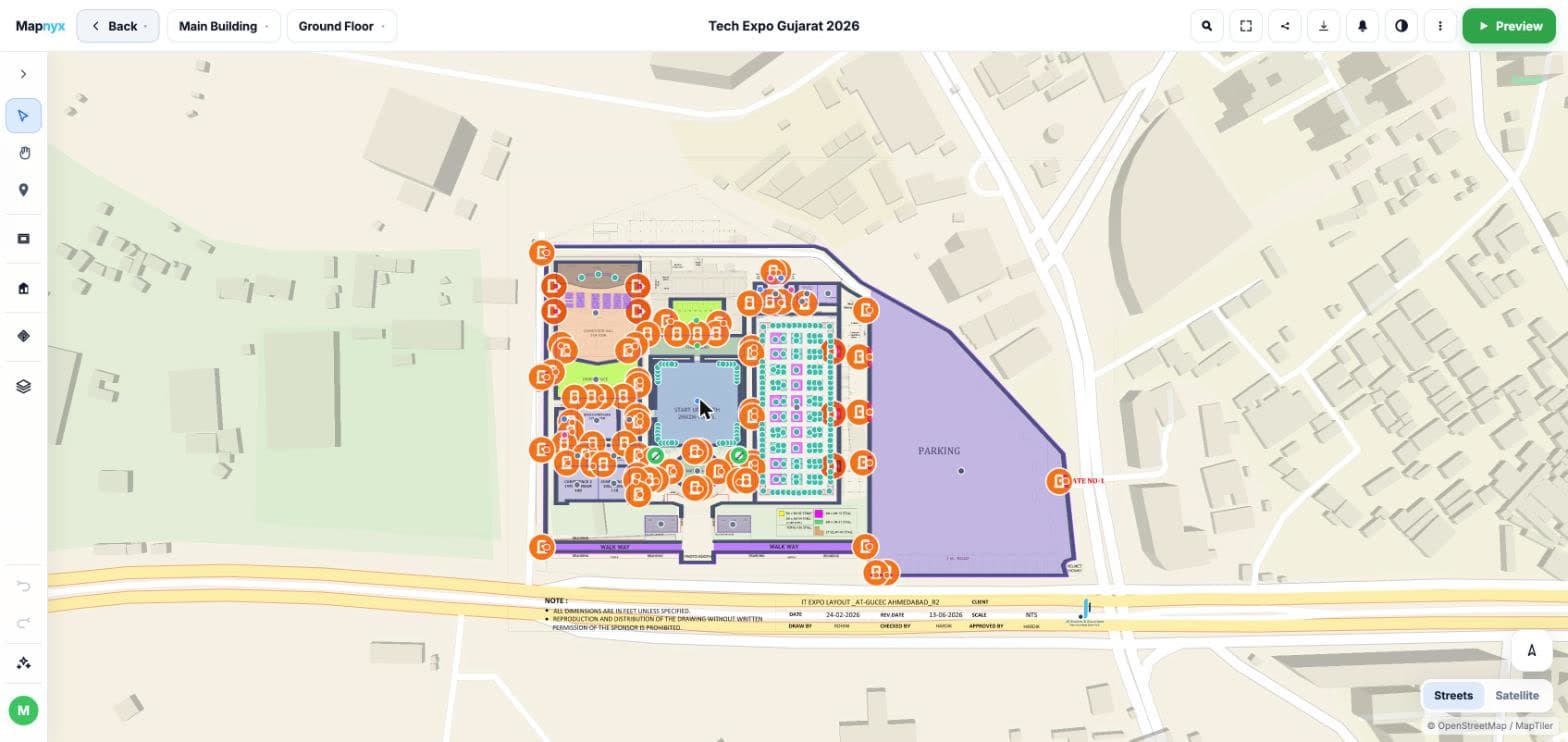
The object palette
- Rectangle, polygon and circle for spaces
- Wall for structure
- POI for anything a visitor might search
- Map banner, text and icon for labelling
Precision
- Grid, vertex and angle snapping with alignment guides
- Wall split, extend, trim, merge and offset
- Polygon holes for courtyards and voids
- Undo and redo, keyboard shortcuts, layer management
- An object inspector, with lock and opacity per object
Without leaving the canvas
- Switch building and floor from the top bar
- Toggle the basemap between streets and satellite
- Jump straight to the visitor preview
+3.00m / AI MAPPING
It draws only what you tick
AI mapping starts from a venue preset and a set of checkboxes, and the dialog says plainly what it is about to do. Nothing is proposed that you did not ask for, and nothing published that a person did not accept.
An unreviewed proposal is one of the things that holds back a publish. Acceptance is a gate in the product, not a setting someone can turn off.
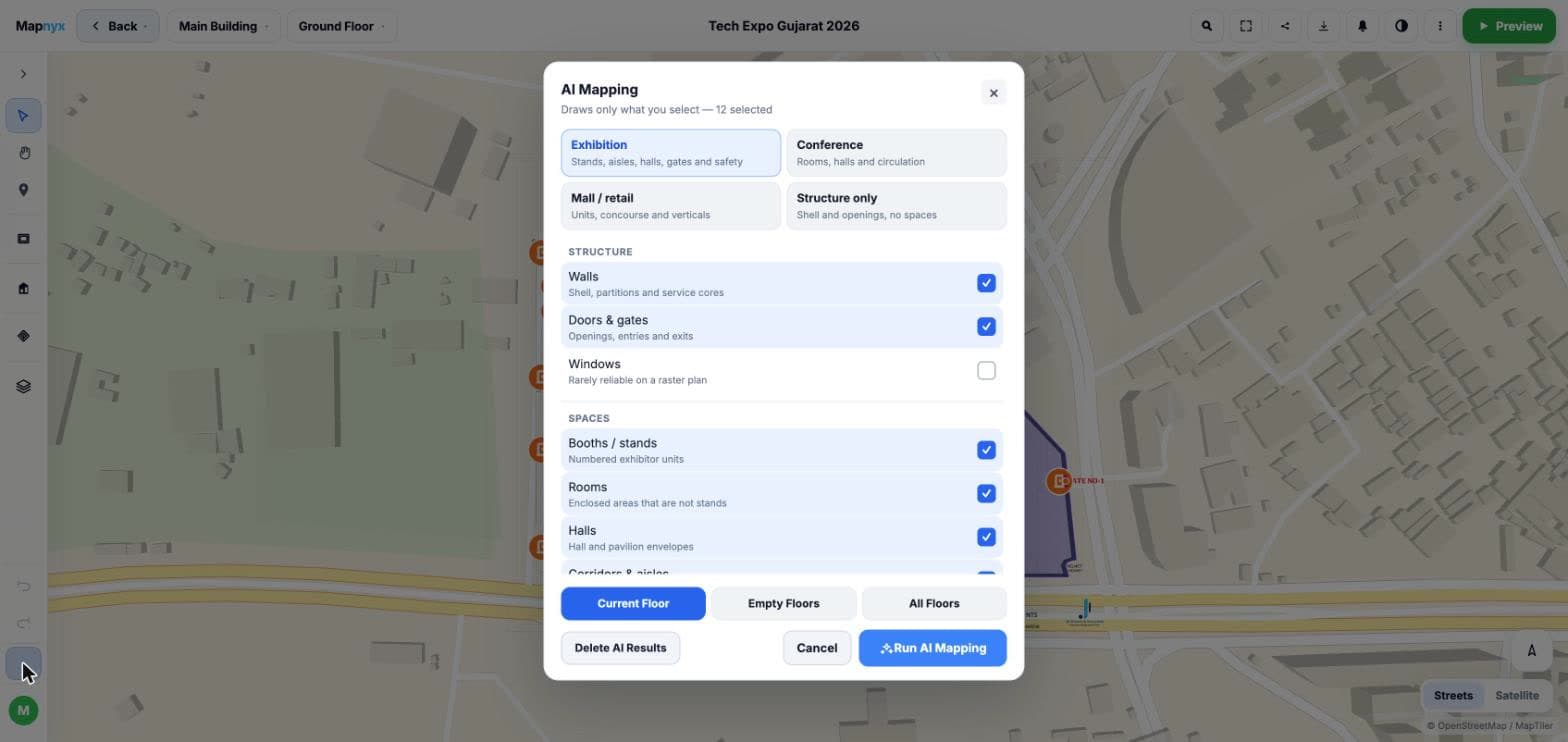
Presets
- Exhibition — stands, aisles, halls, gates and safety
- Conference — rooms, halls and circulation
- Mall or retail — units, concourse and verticals
- Structure only — shell and openings, no spaces
What it may draw
- Structure: walls and service cores, doors and gates
- Windows, offered but flagged in the product as rarely reliable on a raster plan
- Spaces: booths and stands, rooms, hall and pavilion envelopes, corridors and aisles
Scope and undo
- Run on the current floor, only the empty floors, or all of them
- Delete a whole AI run without touching anything drawn by hand
- Accept, reject, split, merge, refine or redraw any single proposal
- Confidence levels flag what needs a closer look
+6.00m / PRESENTATION
How the map opens, per venue
Two venues of the same type rarely want the same first view. Studio sets the opening camera per venue — the angle, the tilt and how close — so a visitor lands looking at the thing the organiser wants them to see.
First-open camera
- Bearing: the rotation the portal opens at, or empty to keep each floor screen-straight
- Pitch: the tilt, from flat top-down to an oblique view
- Zoom: how close the first view sits, or empty to fit the whole floor
- Applied to every floor of the venue, so the experience is consistent
Placement
- Latitude and longitude for the venue itself
- An outdoor campus zoom, separate from the indoor first-open
- Indoor footprint width in metres, which sets how the plan sits on the campus map
Branding
- Portal primary and accent colours, per venue
- Its own favicon
- A venue profile that changes presentation without touching the geometry
- A navigator map theme to match the venue type
- Featured places, to put the handful that matter at the top of search
+6.00m / PREVIEW
Walk it before anyone else does
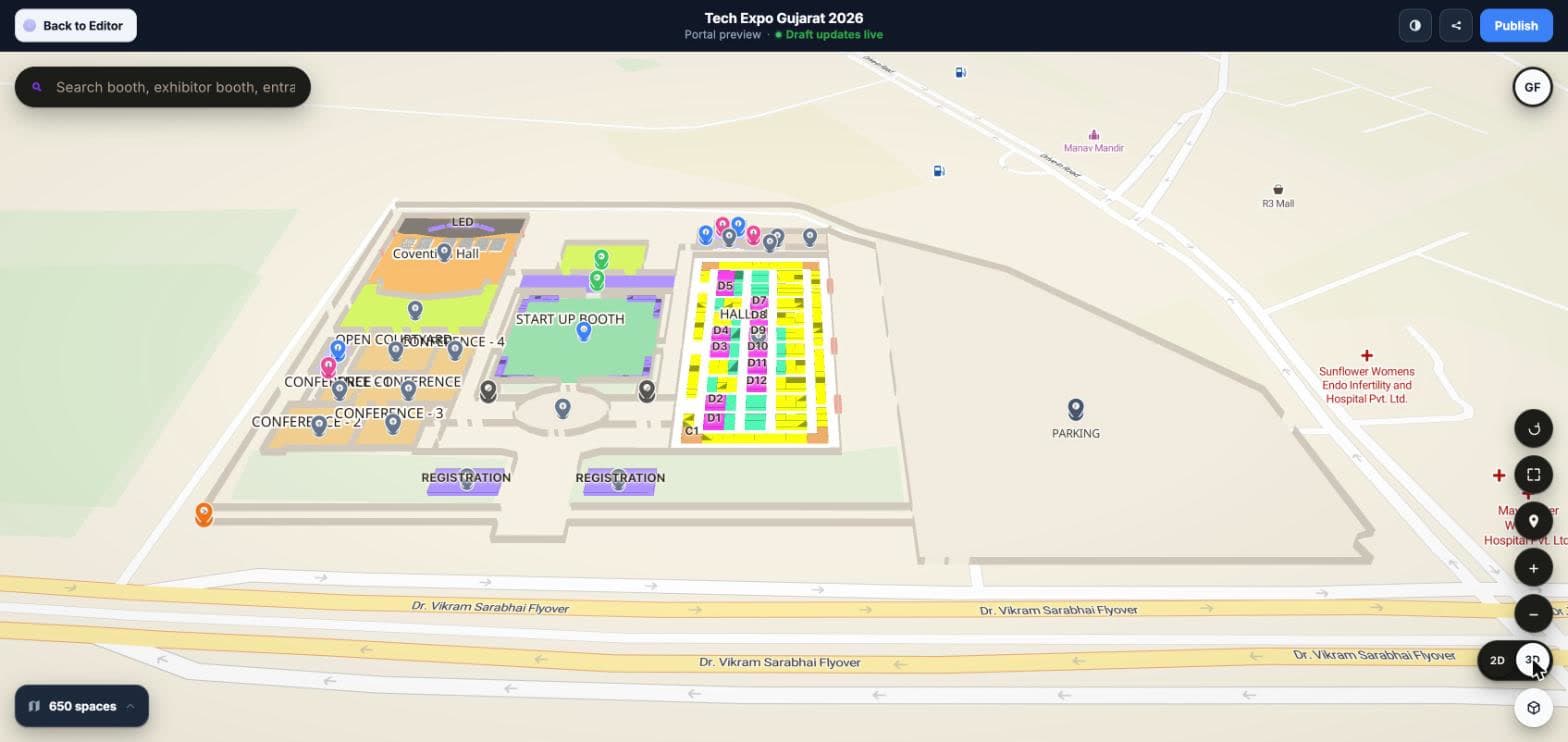
Preview is the visitor experience, not an approximation of it — the same search, the same place pins, the same floor switcher, running on the draft. It says plainly at the top that draft updates are live, so nobody confuses it with what is published.
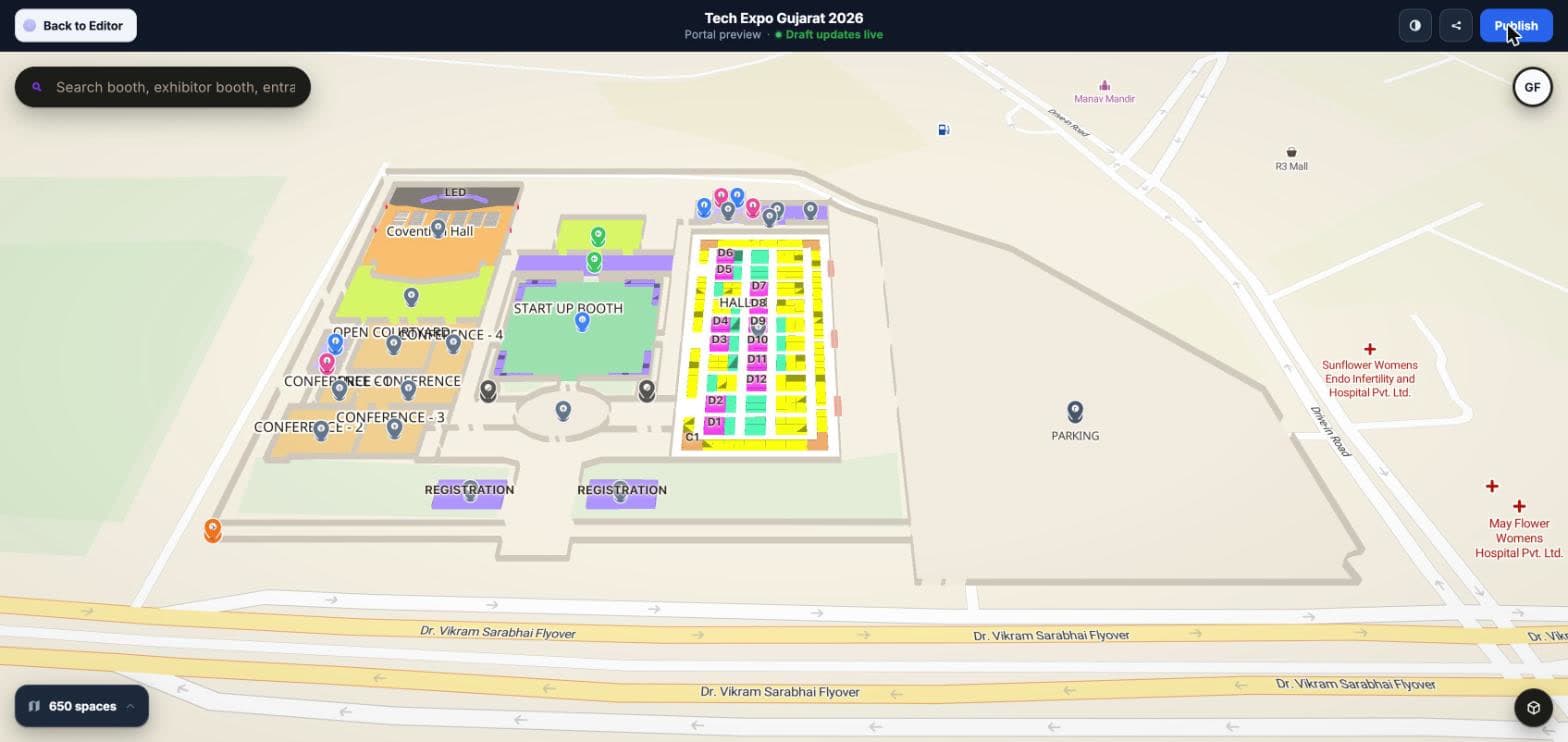
What a visitor gets
- Search across booths, exhibitors, entrances and amenities
- Place pins on every point of interest, categorised
- A floor switcher, and a count of the places on the floor
- Map controls: rotate, zoom, locate, fullscreen, and a 2D / 3D toggle
+9.00m / PUBLISH HEALTH
Checks that name the fix
Publishing runs in three passes — mapping, navigation, then publish — and each warning names the tool that resolves it instead of leaving an operator to guess. Readiness is a percentage, and a graph that cannot route says so in those words.
What gets checked
- Geometry, and places sitting inside their floors
- Places named and categorised
- Navigation nodes and edges, and whether the graph is connected
- Place-to-corridor links
- Routes crossing walls, or cutting through booths and rooms
- AI proposals still unreviewed
What a warning says
- Disconnected corridor components — with auto-build offered to bridge the halls
- Places not linked to the corridor graph — with auto-build or an entrance sync offered
- Halls joined without a door, and unexpected splits in a multi-floor graph
- Preview and published map drifting out of step
- Live counts of confirmed places, navigation nodes with corridor nodes called out, and edges
+9.00m / PUBLISH
A numbered revision, then the edge
Publishing is deliberate and versioned. Each publish is a revision with its own upload record, and the cache warm afterwards reports its result rather than assuming it worked.
In the package
- Campus, buildings and floors
- Places and the search index
- The navigation graph
- Media
Delivery
- Optional edge delivery of the package and viewer assets through object storage and a CDN
- An upload history per venue: revision, what triggered it, the result and whether the purge succeeded
- A cache warm step that reports how many critical URLs were warmed
- Turn edge delivery off and the venue falls back to serving from origin, without republishing
+12.00m / SHARE
Four ways in, issued per venue
Every venue gets its own set of links rather than a single URL somebody has to decorate by hand.
The links
- A portal URL for visitors
- A navigator URL
- A QR code URL for print and signage
- An embed URL, plus a copy-and-paste snippet with geolocation and fullscreen already permitted on the frame
And
- A tokenised link, so a venue can be handed to someone before it is public
- Its own portal favicon
- Kiosk mode and an installable web app on the same venue
+15.00m / ANALYTICS
Six reports, not a dashboard to interpret
Operational analytics for running a venue — stated plainly as that, rather than sold as a BI suite. The useful number is usually the one nobody asks for: the searches that returned nothing.
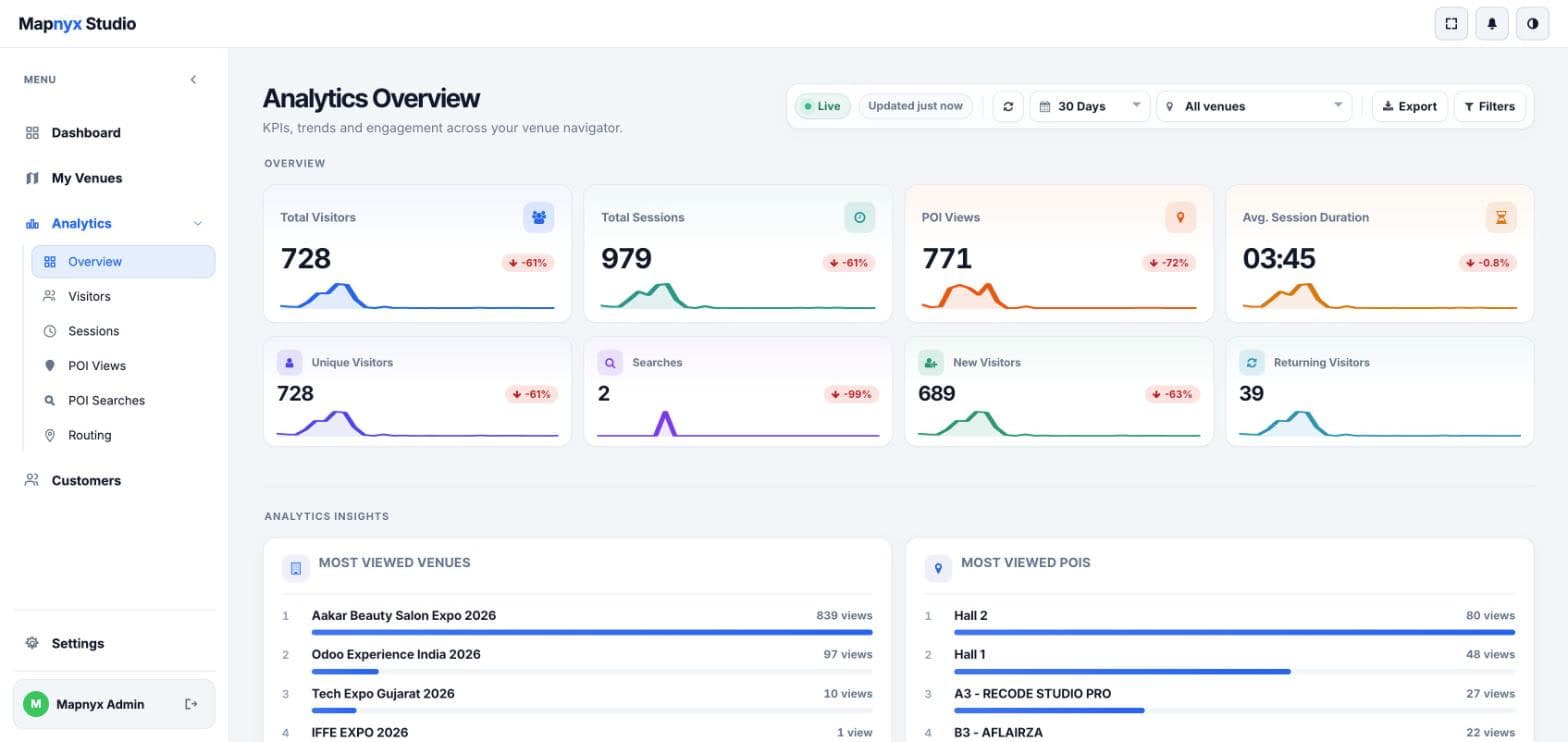
The reports
- Overview — visitors, sessions, place views, average session duration, unique and new against returning, each with a trend
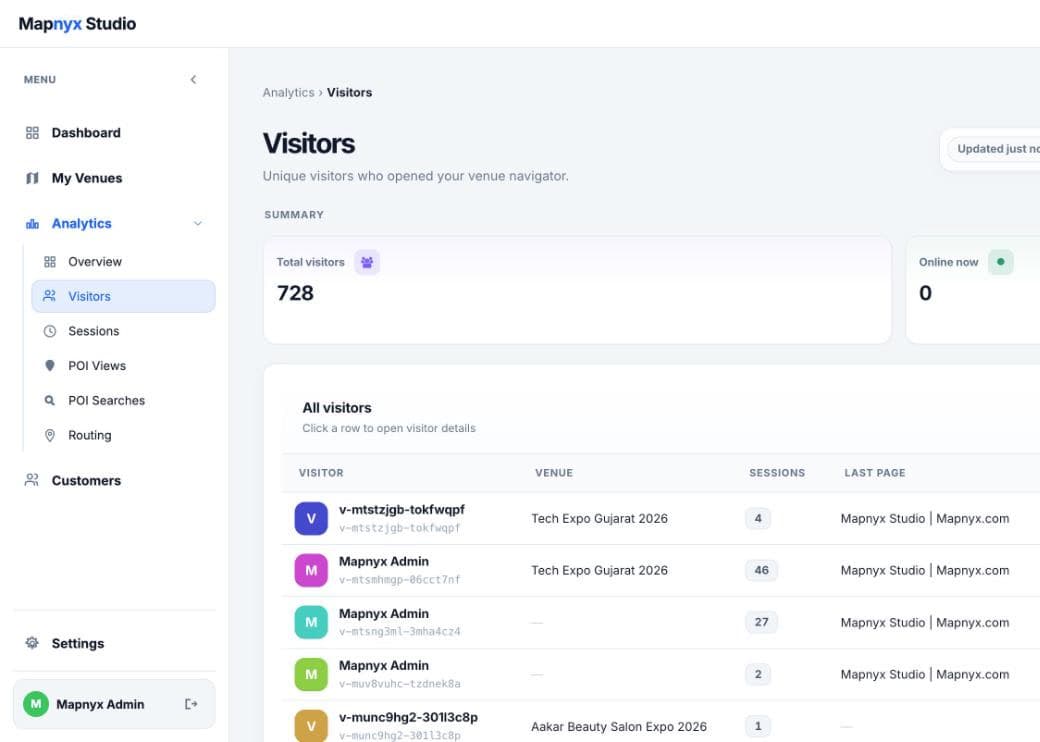
- Visitors — who opened the venue, how many sessions each had, and a live online-now count
- Sessions — what happened inside a visit
- Place views — what drew attention
- Place searches — the query itself, not just the count
- Routing — every route request as a from and to pair against its session
Controls
- Today, yesterday, 7, 30 or 90 days, this month, or a custom range
- One venue or the whole estate
- Export, and filters on top
- Most-viewed venues and most-viewed places, ranked
+18.00m / TENANCY
Built to run other people's venues
Studio assumes you are an operator or an agency, not a single building. Customers, teams and venue workspaces are first-class, so one account can run an estate or a client list.
Tenancy
- Customer accounts, each with their own venue workspaces
- Teams and operator access
- Branded sign-in
- Customer-specific venue data kept apart
+0.00m / EXIT
Send us a plan and we will build the venue
DXF, DWG, PDF, SVG — or a photo of a printed plan. We will structure it, draw it, check the graph and walk you through the result on a real link.