+0.00m / CAPABILITY INDEX
Everything Mapnyx does, in one place
Mapnyx is a digital operating system for physical venues. It takes the floor plans you already have, turns them into a structured digital venue, and runs the search, wayfinding, kiosk and visitor experience on top of it — opened by a link or a QR code, with no app to install.
Exhibition centres, stadiums, malls, airports, hospitals, universities, museums, hotels, stations and corporate campuses all run on the same venue model.
- 01 Upload
- 02 Map
- 03 AI
- 04 Edit
- 05 Connect
- 06 Validate
- 07 Preview
- 08 Publish
- 09 Navigate
- 10 Analyse
Checked against the shipping product on
Build the venue
The visitor experience
Build the venue
Floor plans in, a structured digital venue out — drawn, checked and published by your own team.
+0.00m / STUDIO
Mapnyx Studio
The workspace where a venue is created and maintained. Upload the plans you already have, structure the venue, edit the map, connect the navigation, validate it and publish the visitor experience.
Turn your floor plan into a living digital venue.
- 01 Upload
- 02 Model
- 03 Edit
- 04 Connect
- 05 Validate
- 06 Preview
- 07 Publish
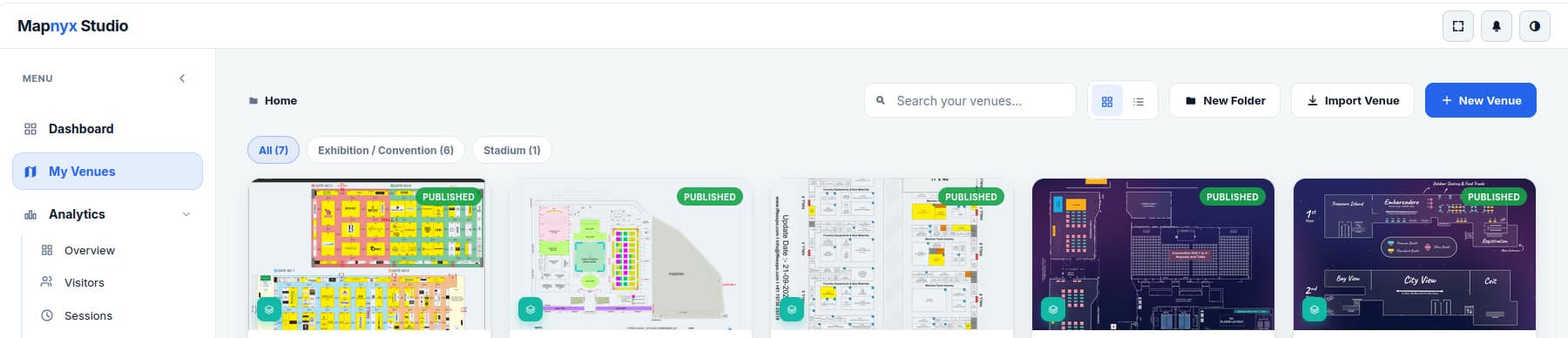
Bring in what you have
- Import DXF, DWG, PDF, SVG, PNG, JPG and WebP
- Convert existing floor plans into interactive maps
- Combine CAD drawings and image-based plans in one venue
Structure the venue
- Create campuses, buildings and multiple floors
- Each floor carries its level number, its building, its own published state and its own place count
- Import a floor from a plan, or add an empty one and draw it
- Define real-world floor dimensions
- Georeference indoor maps to the venue's actual location
- Add rooms, halls, booths, zones and facilities
Publish and share
- Add POIs with images, descriptions and categories
- Add map labels, icons, banners and media
- Preview the visitor experience before publishing
- Share and embed published maps
- Manage customers and teams from one workspace
Running more than one venue
- Every venue carries its state — draft, published or demo — on its card
- Filter the estate by venue type, and group venues into folders
- Building and floor counts, and the last edit, visible without opening anything
- Import a venue rather than starting from an empty floor
+0.00m / EDITOR
Interactive venue editor
A visual editor that turns a static plan into structured, interactive geometry — with the drawing tools a floor-plan professional expects rather than a simplified shape palette.
Build your digital venue with the precision of a professional floor-plan editor.
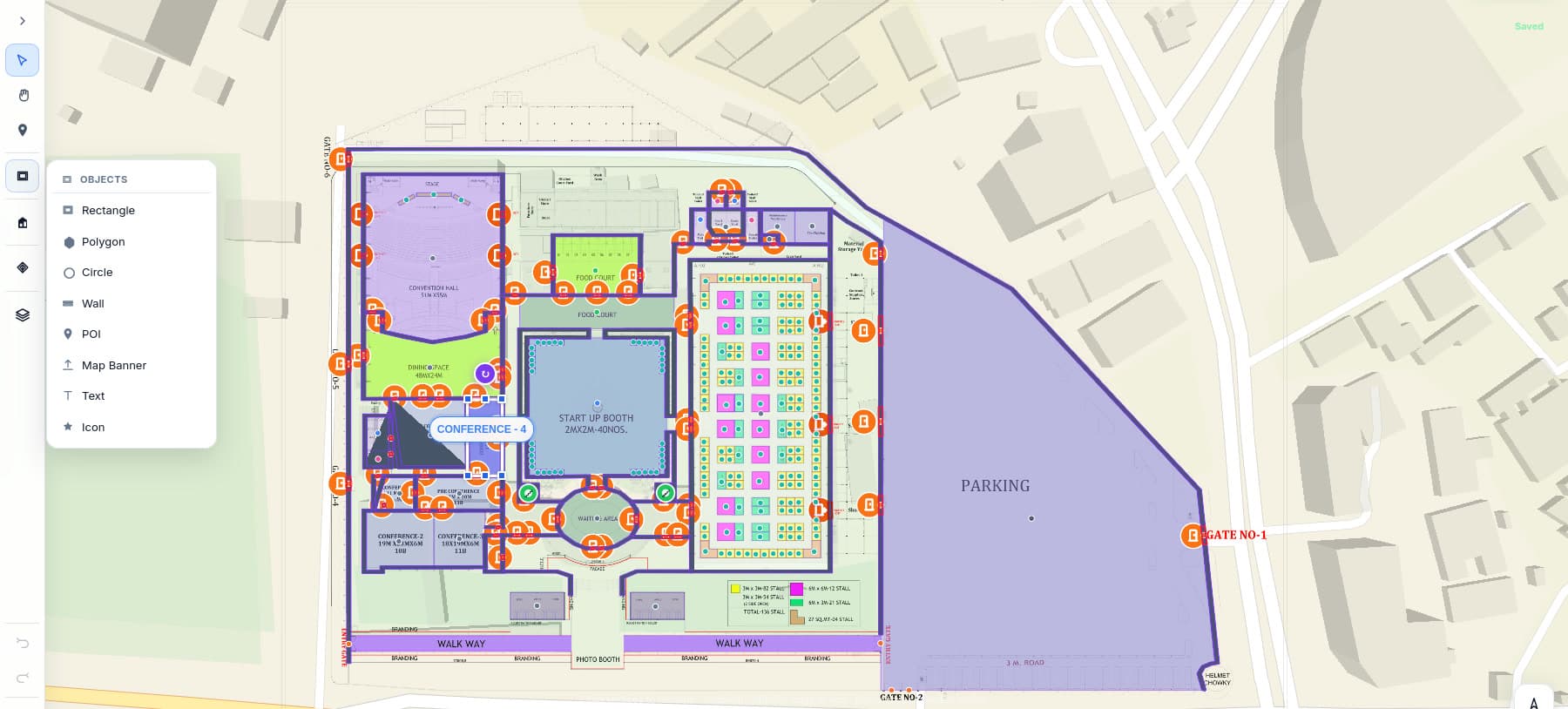
Draw and edit
- Walls, rooms, halls, booths, corridors and zones
- Furniture, tables, cafés, stages, seating and food courts
- Parking, entrances and emergency exits
- Stairs, elevators, escalators and ramps
- Doors, windows, POIs, text and annotations
Precision tools
- An object palette of rectangle, polygon, circle, wall, POI, map banner, text and icon
- Street or satellite basemap under the plan, so the venue is drawn on the real site
- Campus, building and floor switching without leaving the canvas, and preview from the editor
- Grid, vertex and angle snapping with alignment guides
- Wall split, extend, trim, merge and offset
- Polygon holes for courtyards and voids
- Undo / redo and keyboard shortcuts
- Layer management, object inspector, lock and opacity
+0.00m / AI MAPPING
AI mapping, with a human decision
Raster plans and scanned drawings are the slowest thing to digitise. Mapnyx proposes the geometry it recognises — walls, rooms, doors, windows, stairs, lifts, safety elements and labels — so the work starts from a draft instead of a blank canvas.
Let AI do the tracing. Let people make the final call.
Human in the loop
- Every proposal is reviewed: accept, reject, ignore or convert
- Split, merge, refine or redraw any suggestion
- Confidence levels flag the areas that need attention
- Nothing AI-generated reaches a published map without operator acceptance
What it is allowed to draw
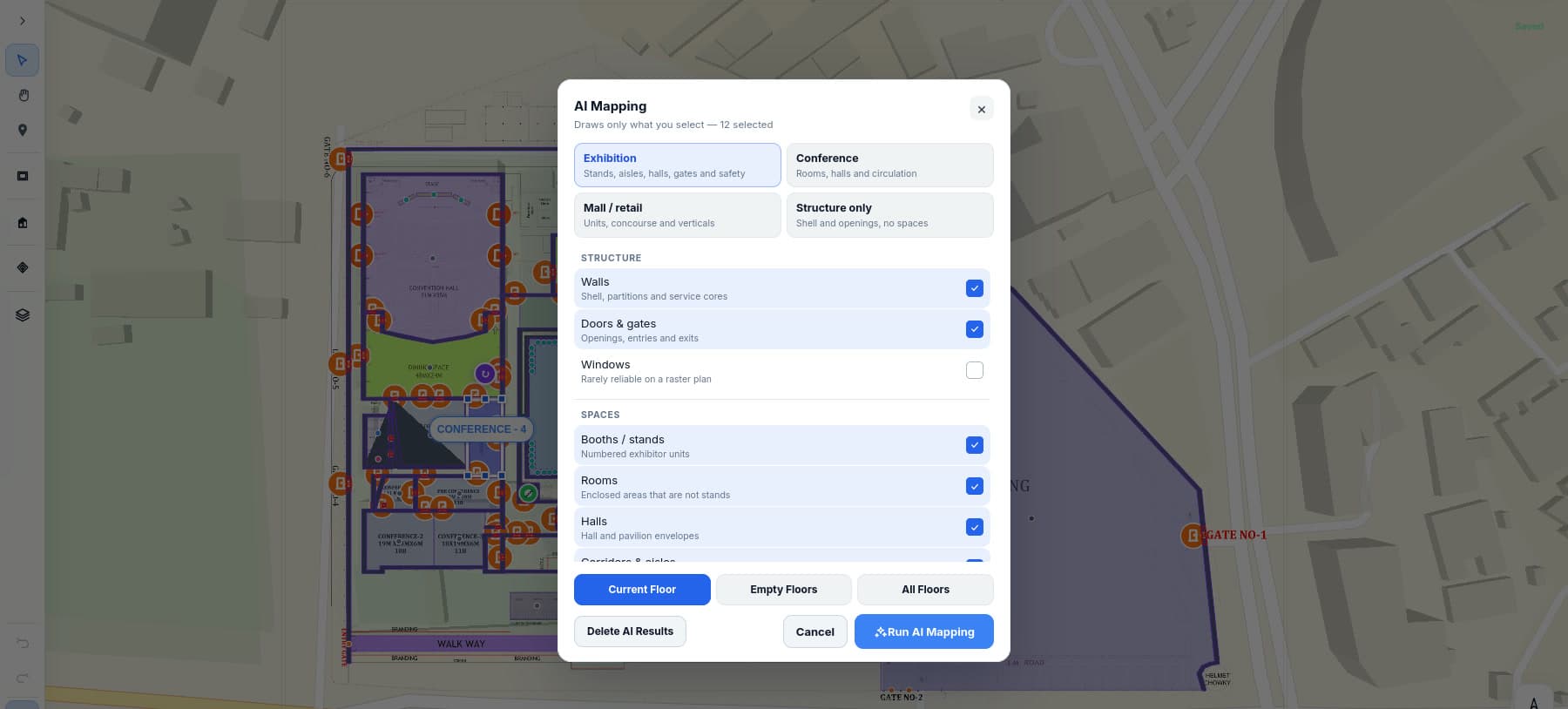
- Venue presets: exhibition (stands, aisles, halls, gates and safety), conference (rooms, halls and circulation), mall or retail (units, concourse and verticals), or structure only
- Structure: walls and service cores, doors and gates — windows are offered but flagged as rarely reliable on a raster plan
- Spaces: booths and stands, rooms, hall and pavilion envelopes, corridors and aisles
- It draws only what the operator ticks, and the run can be scoped to the current floor, the empty floors, or all of them
- A run can be discarded wholesale without touching anything drawn by hand
Assistant tasks
- Build navigation graphs
- Find disconnected corridors
- Suggest emergency exits
- Convert booths into searchable places, and rename them
- Create routes between locations
Acceptance is a hard requirement in the product specification, not a setting — an unreviewed proposal is also one of the checks that can hold back a publish.
+0.00m / PUBLISH HEALTH
Quality checks and publish readiness
A map that routes people through a wall is worse than no map. Mapnyx checks the venue before it goes live and scores how ready it is.
Don't publish a map you haven't validated.
What gets checked
- Geometry validation, and places sitting inside their floors
- Places named and categorised
- Navigation nodes, edges and a connected graph
- Place-to-corridor links
- Routes crossing walls, or cutting through booths and rooms
- AI proposals still unreviewed
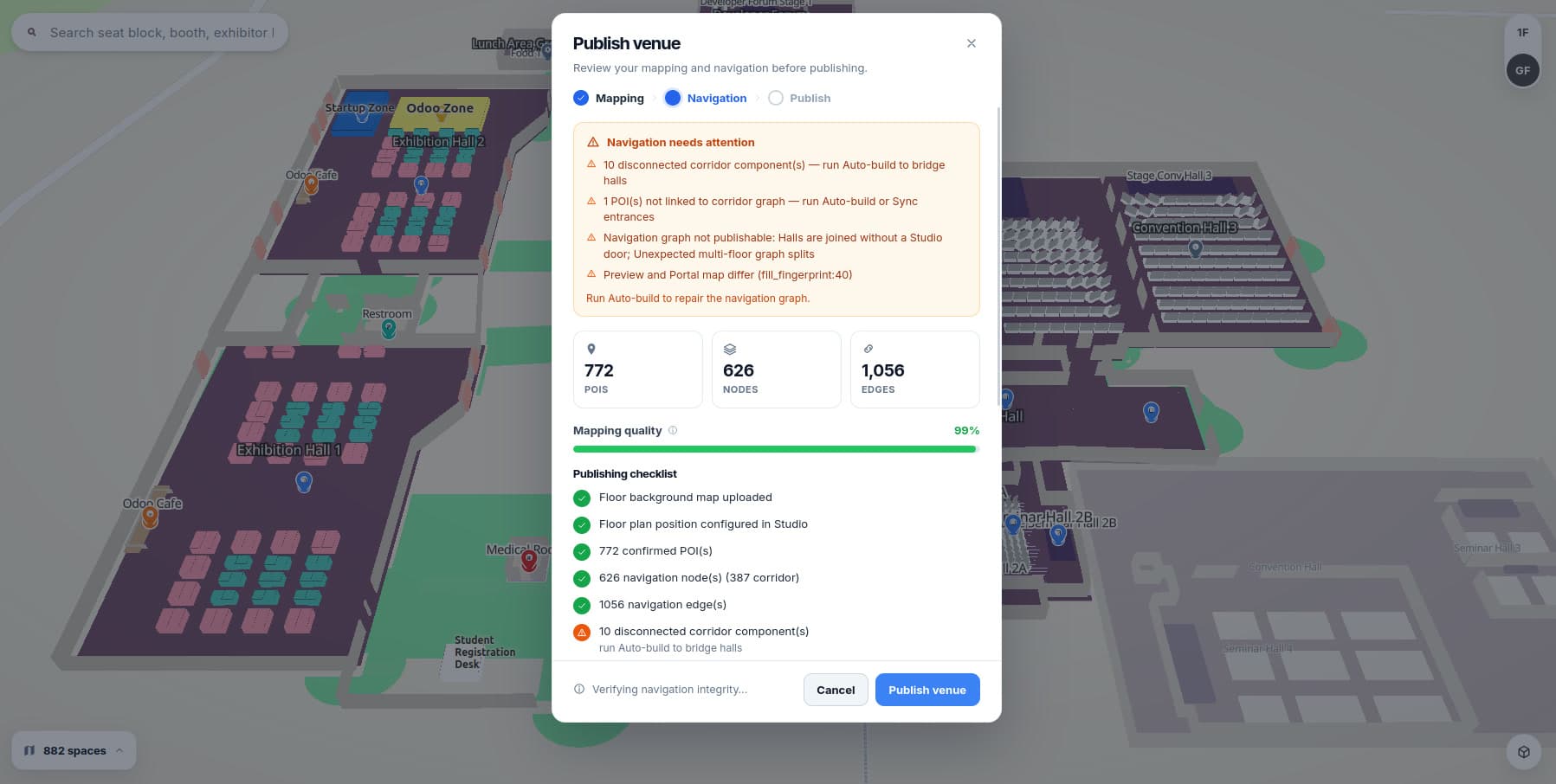
What a warning actually says
- Disconnected corridor components, with auto-build offered to bridge the halls
- Places not linked to the corridor graph, with auto-build or an entrance sync offered
- Halls joined without a door, and unexpected splits in a multi-floor graph
- Preview and published map drifting out of step
- Live counts of confirmed places, navigation nodes — corridor nodes called out separately — and edges
Checks run in three passes — mapping, navigation, then publish — and each warning names the tool that fixes it rather than leaving the operator to guess. Readiness is scored as a percentage, and a graph that cannot be routed says so in those words rather than failing quietly at a kiosk.
+0.00m / PUBLISH
One-click publish
Publishing is a deliberate step with a draft behind it, not an autosave that reaches visitors by accident.
- 01 Draft
- 02 Quality check
- 03 Preview
- 04 Publish
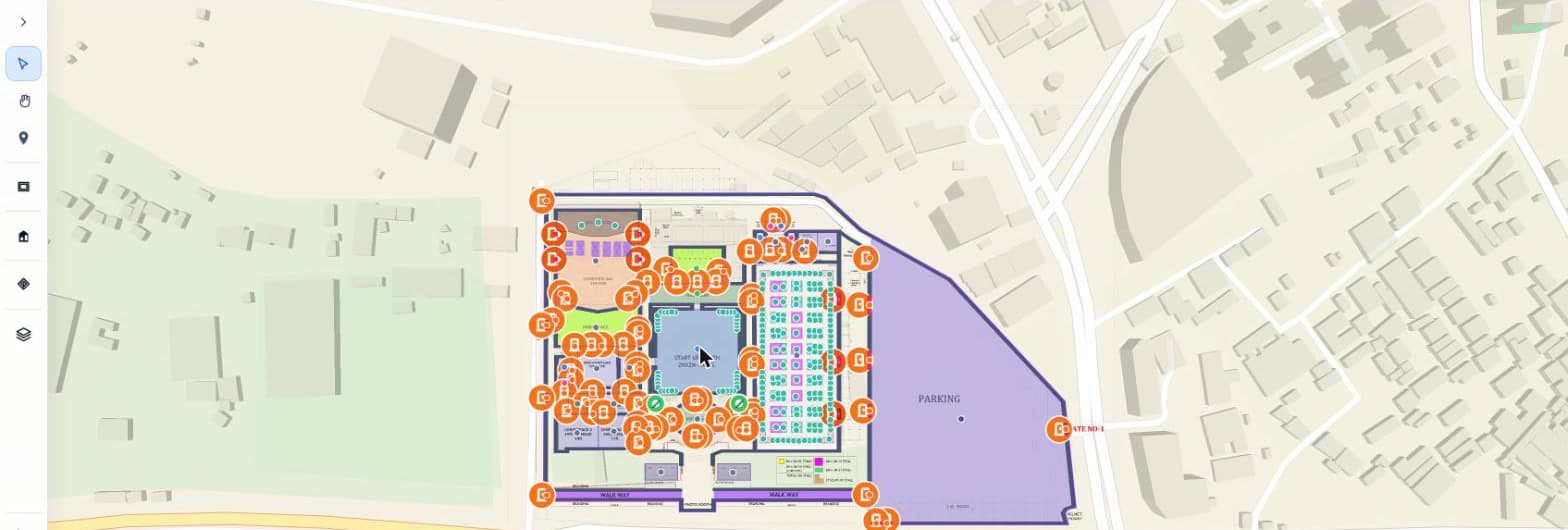
What ships in a published package
- Campus, buildings and floors
- Places and the search index
- The navigation graph
- Media
Delivery
- Versioned venue packages — each publish is a numbered revision with its own upload record
- Optional edge delivery of the package and viewer assets through object storage and a CDN
- The cache is warmed after an upload, and the result is reported rather than assumed
- Turn edge delivery off and the venue falls back to serving from origin, without republishing
The visitor experience
What a visitor actually touches: a link or a QR code that opens the venue, finds the place and walks them there.
+0.00m / 2.5D & 3D
2.5D and 3D digital venue
The same venue model renders as a flat plan, a 2.5D view or full 3D volumes. Large and complex venues stop being a diagram people have to decode.
One venue model. Multiple experiences.
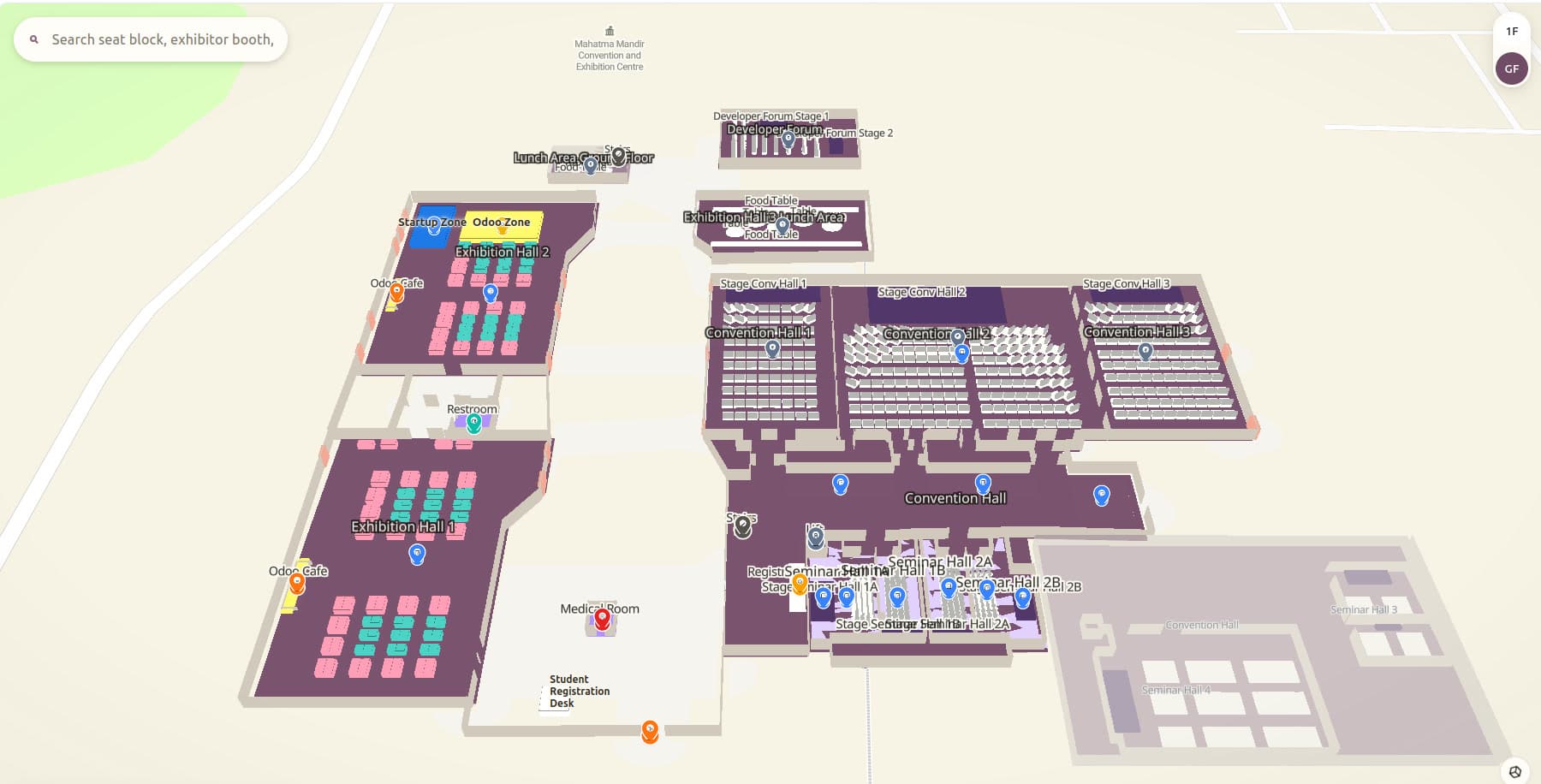
Rendering
- 2D floor plans, 2.5D visualisation and 3D floor volumes
- Extruded walls and spaces, booth visualisation
- POI markers and route visualisation
- Indoor and outdoor context, campus and building maps
- Multi-floor environments with dynamic labels
- Level-of-detail rendering
Venue profiles
- One set of geometry, presented for exhibitions, stadiums, malls, airports, hospitals, universities, museums, hotels, warehouses, offices, stations, smart buildings, theme parks or a custom venue
- Profiles change presentation only — never the underlying venue geometry
+0.00m / NAVIGATION
Indoor navigation and wayfinding
Venue geometry becomes a connected walkable network, so any point routes to any other — booth to booth, hall to hall, floor to floor, building to building.
Don't just show people where something is. Show them how to get there.
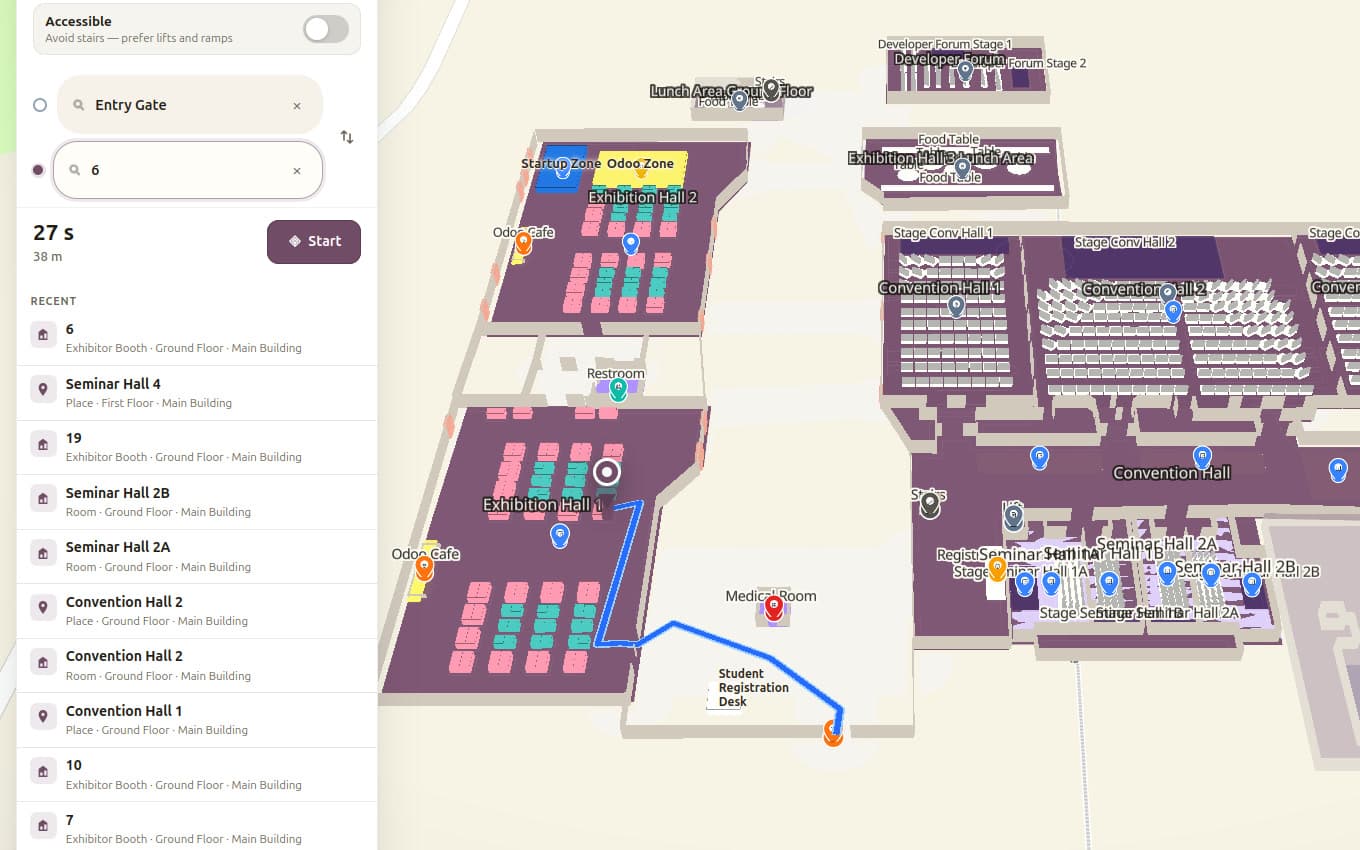
Routing
- Walkable navigation graph with shortest-path routing
- Multi-floor navigation across lifts, stairs, escalators and ramps
- Step-free accessibility mode that excludes inaccessible links and prefers lifts and ramps
Keeping routes honest
- Route testing and graph health checks
- Disconnected-path detection
- Wall, room and booth collision validation
+0.00m / SEARCH
Smart search and discovery
Visitors shouldn't need to know where something is before they can find it. Search covers exhibitors, booths and brands as well as halls, rooms, facilities, food, restrooms, parking, entrances, emergency exits and sessions.
- 01 Search
- 02 Select
- 03 Navigate
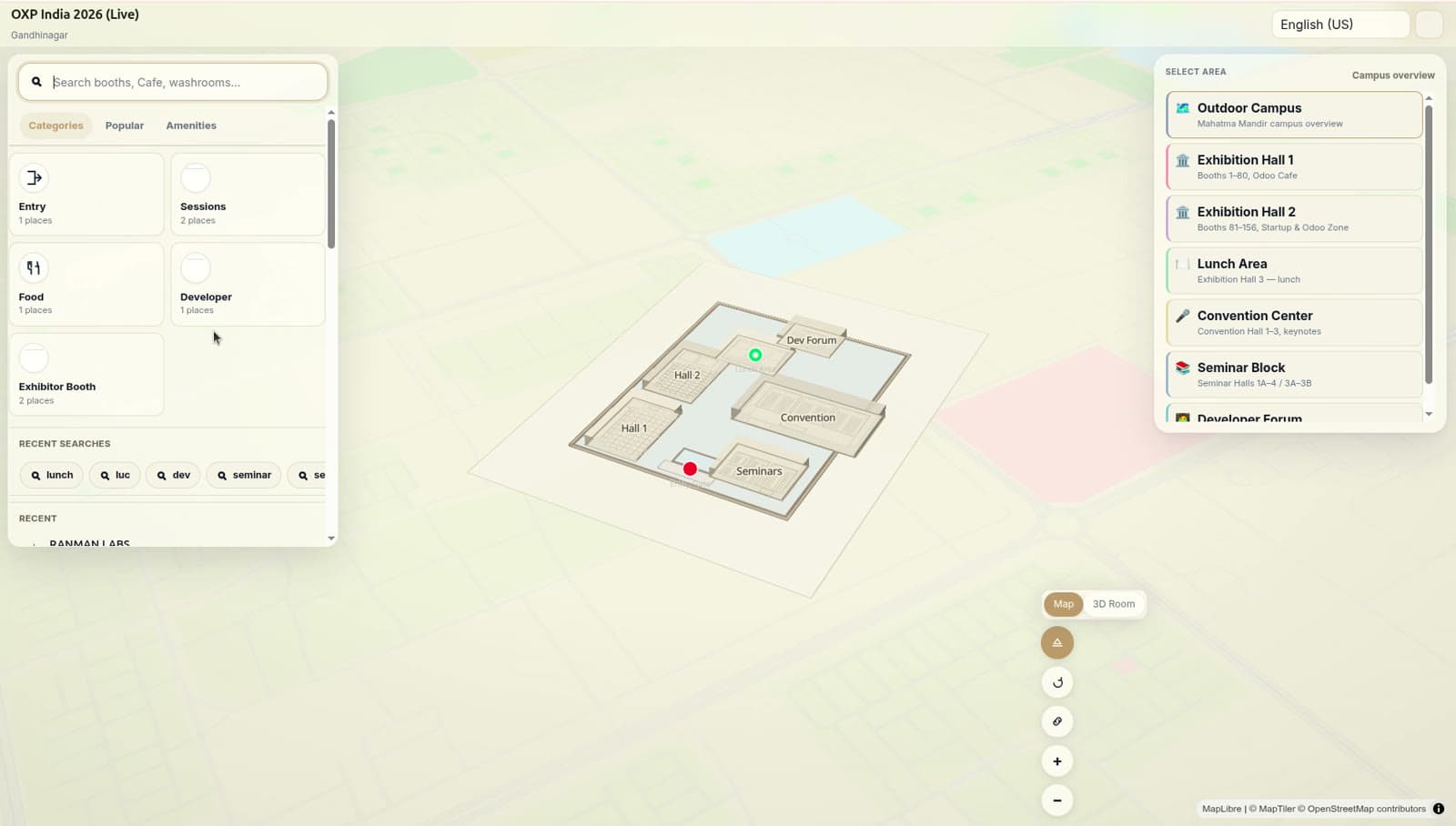
In the portal
- Place and category search
- Place cards with the detail a visitor needs
- Directions from the card
- Floor switching
+0.00m / VISITOR PORTAL
Visitor portal
The venue opens in a browser. No native app, no install, no account — which is the only way adoption works for someone attending once.
One link. One QR code. An entire venue in your pocket.
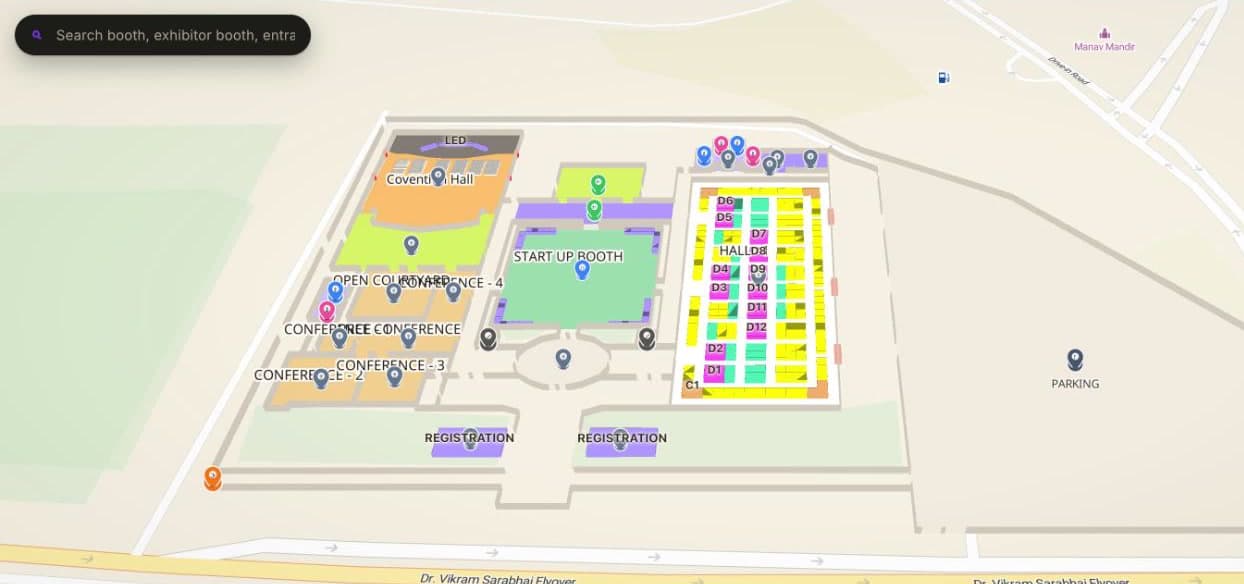
What a visitor can do
- Open a venue link or scan a QR code
- Search locations and explore the venue
- View booth and exhibitor information
- Get directions, switch floors, explore buildings and follow routes
- Share a location
- Use kiosk mode, or install the web app
Tuned per venue, not per visitor
- How the map opens is set per venue: bearing, tilt and zoom on first load, so a visitor lands looking the way the organiser wants
- Leave the framing empty and each floor opens square to the screen, fitted to the whole floor
- The indoor plan is placed on the outdoor campus map by latitude, longitude and footprint width in metres
- Portal primary and accent colours, and its own favicon, per venue
- Featured places put the handful that matter at the top of search
Built for every screen
- Mobile phones
- Tablets
- Desktop
- Kiosks
+0.00m / QR
QR-based venue experience
Put QR codes where people stop and look up: entrances, halls, registration, parking, lifts, stairs, escalators, information desks, food courts, booths and conference rooms.
- 01 Scan
- 02 Location identified
- 03 Navigate
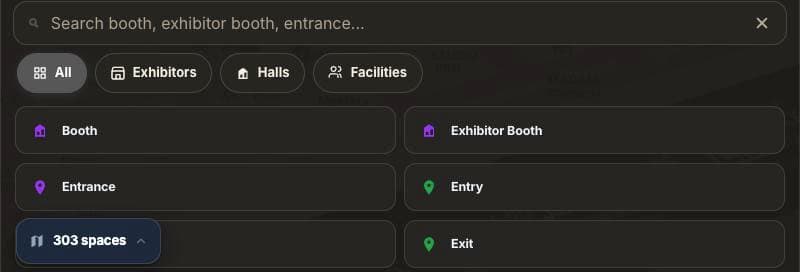
Access
- QR and token-based share links
- A scan resolves to the visitor's actual position in the venue, so routing starts from where they stand
+0.00m / OFFLINE
Offline and resilient
Venue Wi-Fi fails exactly when a venue is busiest. A published venue package can be saved to the visitor's device so search and navigation keep working.
What the saved package holds
- Venue maps and floor data
- Places and the search index
- The navigation graph
- Media
Where it matters most
- Stadiums, exhibition and convention centres
- Airports, large malls and universities
- Anywhere thousands of visitors hit the same venue at once
+0.00m / KIOSK
Kiosk mode
The same venue, full screen, on a touch kiosk or an info point — so visitors can answer their own question instead of queuing at a desk.
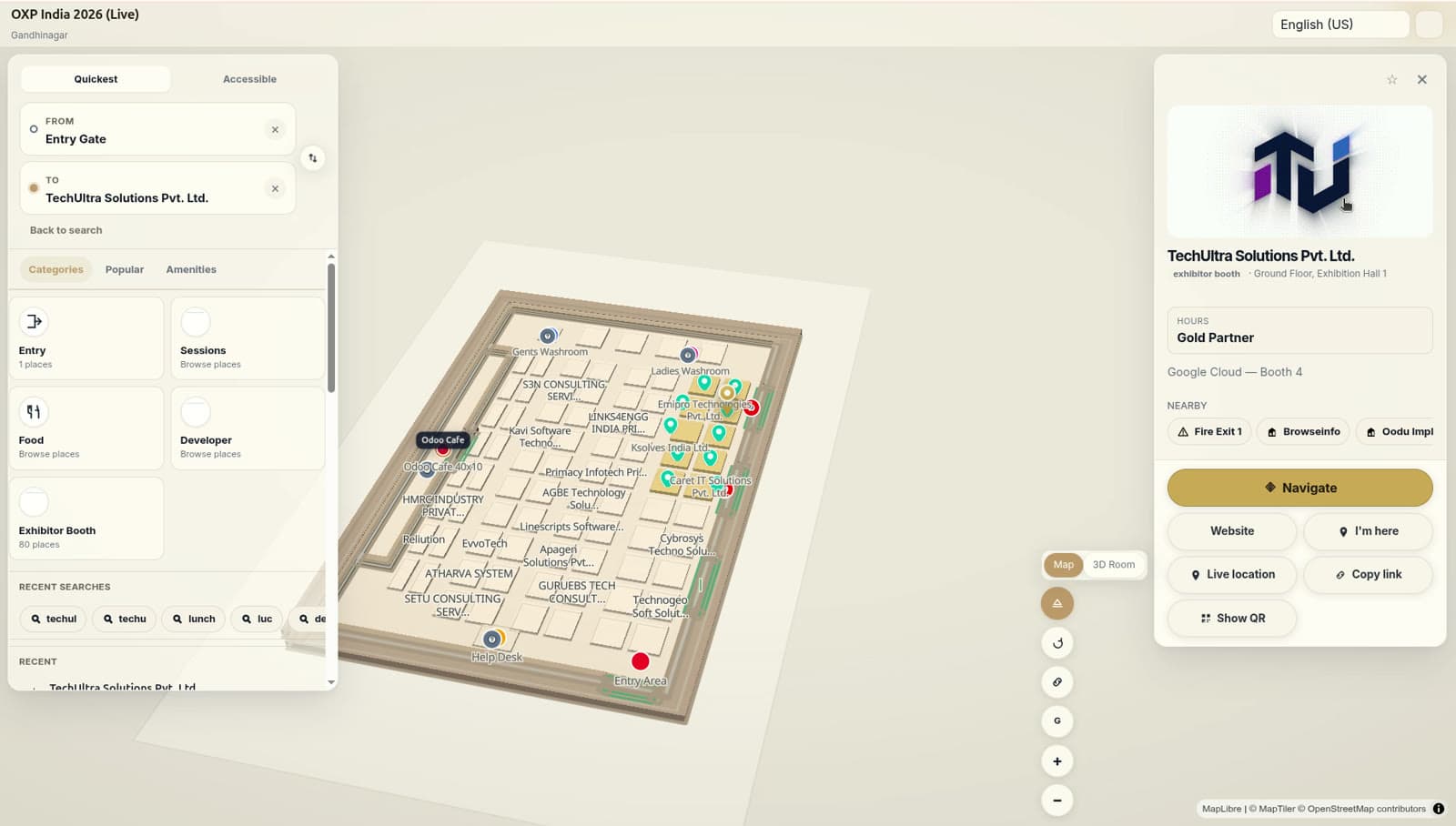
At the kiosk
- Search for exhibitors and find halls
- Locate facilities
- Get directions and explore the venue
- Carry the route onward to a phone
+0.00m / CAMPUS
Campus and indoor navigation
Most visitors are lost before they reach the door. Outdoor campus context connects to indoor navigation, so a route runs the whole way.
- 01 Campus
- 02 Building
- 03 Floor
- 04 Destination
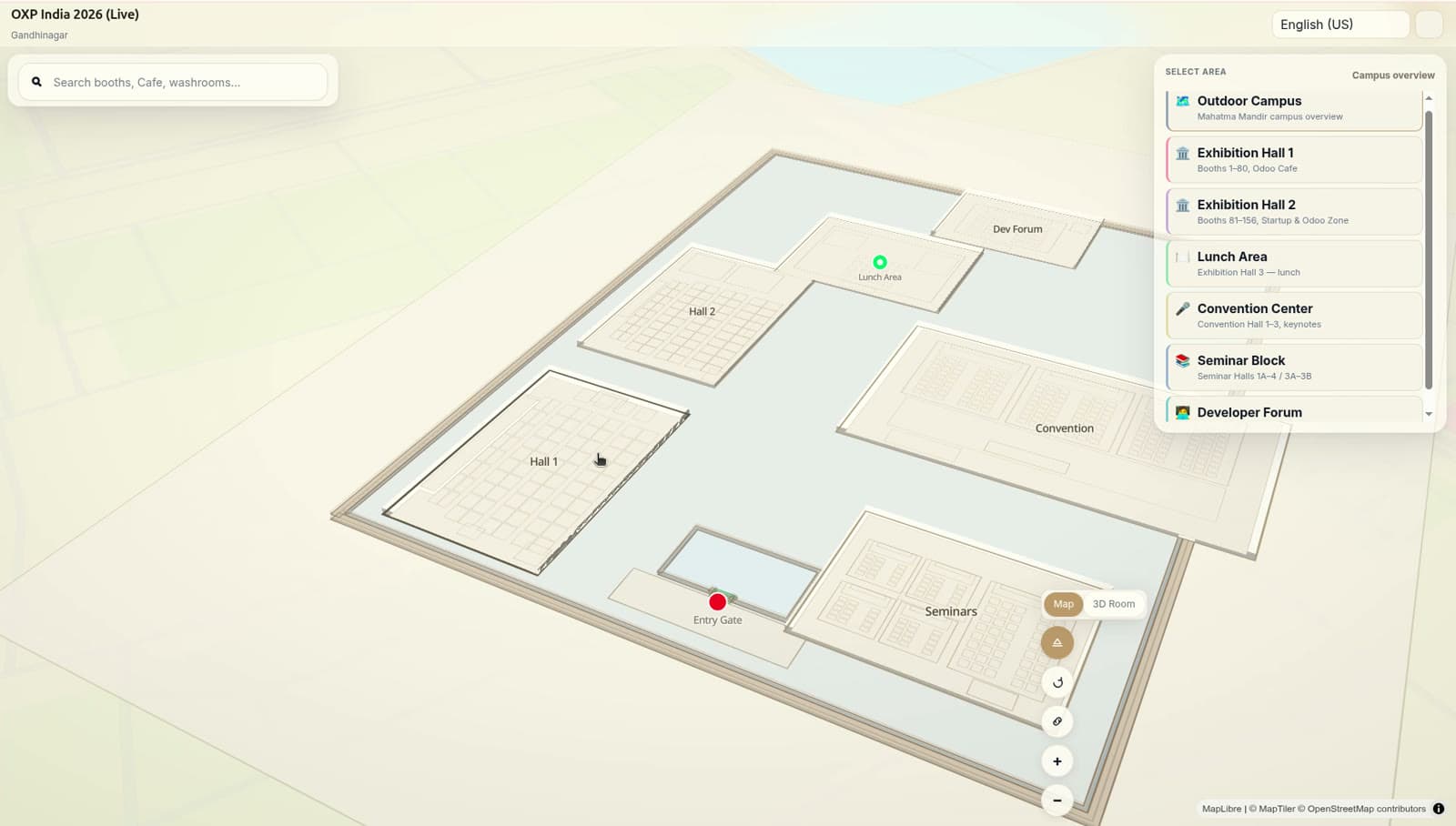
Built for estates
- Universities, airports and hospitals
- Convention centres and stadium complexes
- Corporate campuses and large exhibition venues
The model underneath
- Campus, building, floor, zone and POI hierarchy
- Vertical connections between floors
Operate the venue
What the operator gets after launch: evidence of how the venue is used, and the controls to run several of them.
+0.00m / ANALYTICS
Venue analytics
Operational analytics on how visitors use the digital venue — the questions an organiser actually asks on day two.
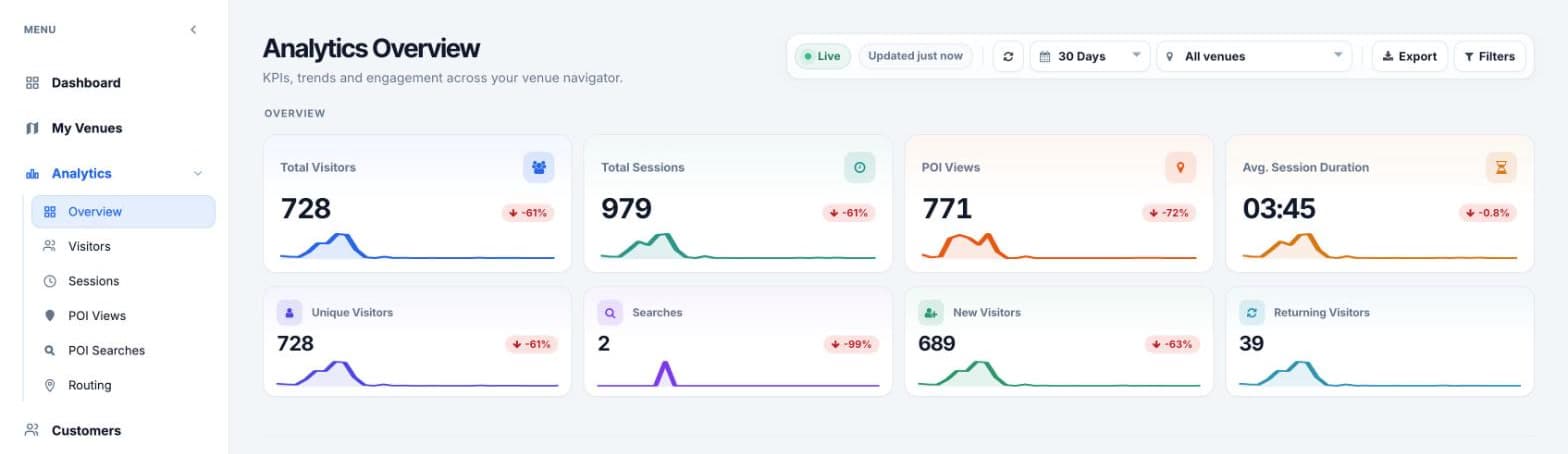
The reports
- Overview, visitors, sessions, place views, place searches and routing
- Total and unique visitors, sessions, place views, searches, and average session duration
- New against returning visitors
- Most viewed venues and most viewed places, ranked
- A period selector — today, 7, 30 or 90 days, this month or a custom range — one venue or the whole estate, and an export
- Every route request is kept as a from/to pair against its session, so you can see which journeys people actually asked for
- Searches are logged with the query itself, and a row opens the full activity behind it
What is measured
- Visitor sessions, device types, browsers and languages
- Visit frequency
- Most viewed places and popular searches
- Failed searches
- Floor views, zone entries, place views and route requests
The questions it answers
- What are visitors looking for?
- Which locations draw the most attention?
- Where are visitors struggling to find something?
- Which searches are returning nothing?
These are operational analytics for running a venue, not a full BI suite — stated plainly so nobody buys it expecting one.
+0.00m / ESTATE
Multi-venue and multi-building management
Built for operators running more than one venue, with draft and published maps managed side by side from a single workspace.
- 01 Campus
- 02 Buildings
- 03 Floors
- 04 Zones
- 05 Places
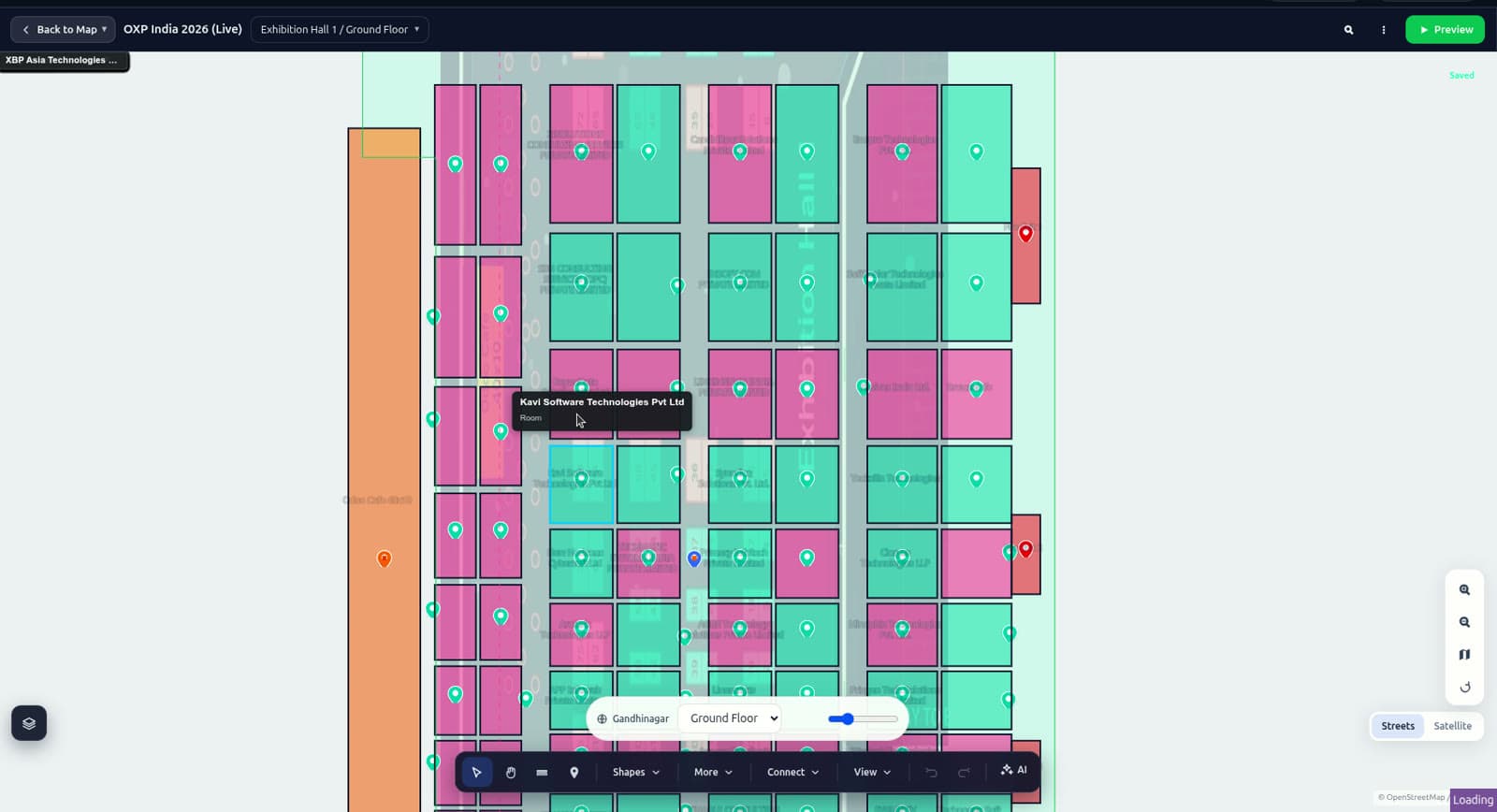
Across the estate
- One workspace for every venue you run
- Draft and published maps managed together
- A venue is mapped once and reused season after season
+0.00m / TENANCY
Multi-tenant platform
Every customer gets their own venue workspace, which is what lets one platform serve many venue owners and event organisers at once.
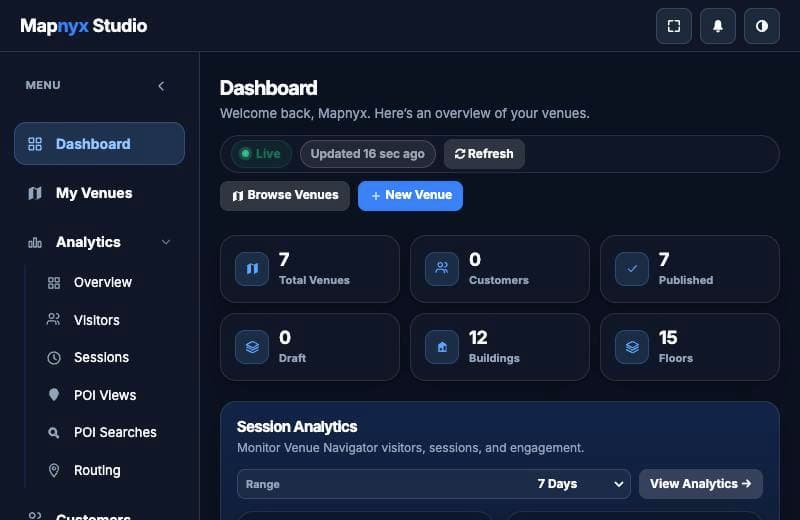
Tenancy
- Customer accounts and teams
- Branded sign-in
- Venue workspaces with customer-specific data
- Operator access
+0.00m / VENUE PROFILES
One platform, configured for the venue you run
A profile changes how the venue is presented — not the geometry underneath it.
Exhibition & convention
Booths, exhibitors, halls, sessions and visitor navigation.
Stadiums
Gates, seating, facilities, concessions, restrooms and navigation.
Shopping malls
Stores, restaurants, services, parking and floor-to-floor navigation.
Airports
Terminals, gates, lounges, baggage, facilities and connections.
Hospitals
Departments, clinics, wards, pharmacies and accessibility routes.
Universities
Buildings, classrooms, departments, labs and campus navigation.
Hotels
Rooms, restaurants, meeting spaces and amenities.
Museums
Galleries, exhibits, facilities and visitor routes.
Railway stations
Platforms, entrances, facilities and passenger navigation.
Corporate campuses
Buildings, offices, meeting rooms and amenities.
+0.00m / PLATFORM
Platform capabilities
The complete list, for anyone comparing line by line.
- Digital venue modelling
- CAD / PDF / SVG / image import
- Georeferencing
- Interactive venue editing
- AI-assisted mapping
- 2D mapping
- 2.5D visualisation
- 3D visualisation
- POI management
- Booth and exhibitor mapping
- Indoor navigation
- Multi-floor routing
- Multi-building navigation
- Accessibility routing
- Search
- QR-based access
- Shareable locations
- Visitor portal
- Kiosk mode
- Offline venue packages
- Edge delivery
- Quality validation
- Publish readiness
- Versioned venue packages
- Visitor analytics
- Search analytics
- Venue analytics
- Multi-tenant SaaS
- Customer and team management
+0.00m / EXIT
See it running on your own floor plan
Book a walkthrough, or send us a plan and we'll show you the venue it becomes.